> ## Documentation Index
> Fetch the complete documentation index at: https://docs.insforge.dev/llms.txt
> Use this file to discover all available pages before exploring further.
# Sites
> Deploy the frontend of your InsForge project to Vercel from the CLI or dashboard, with tracked URLs, environment variables, domains, and deployment history.
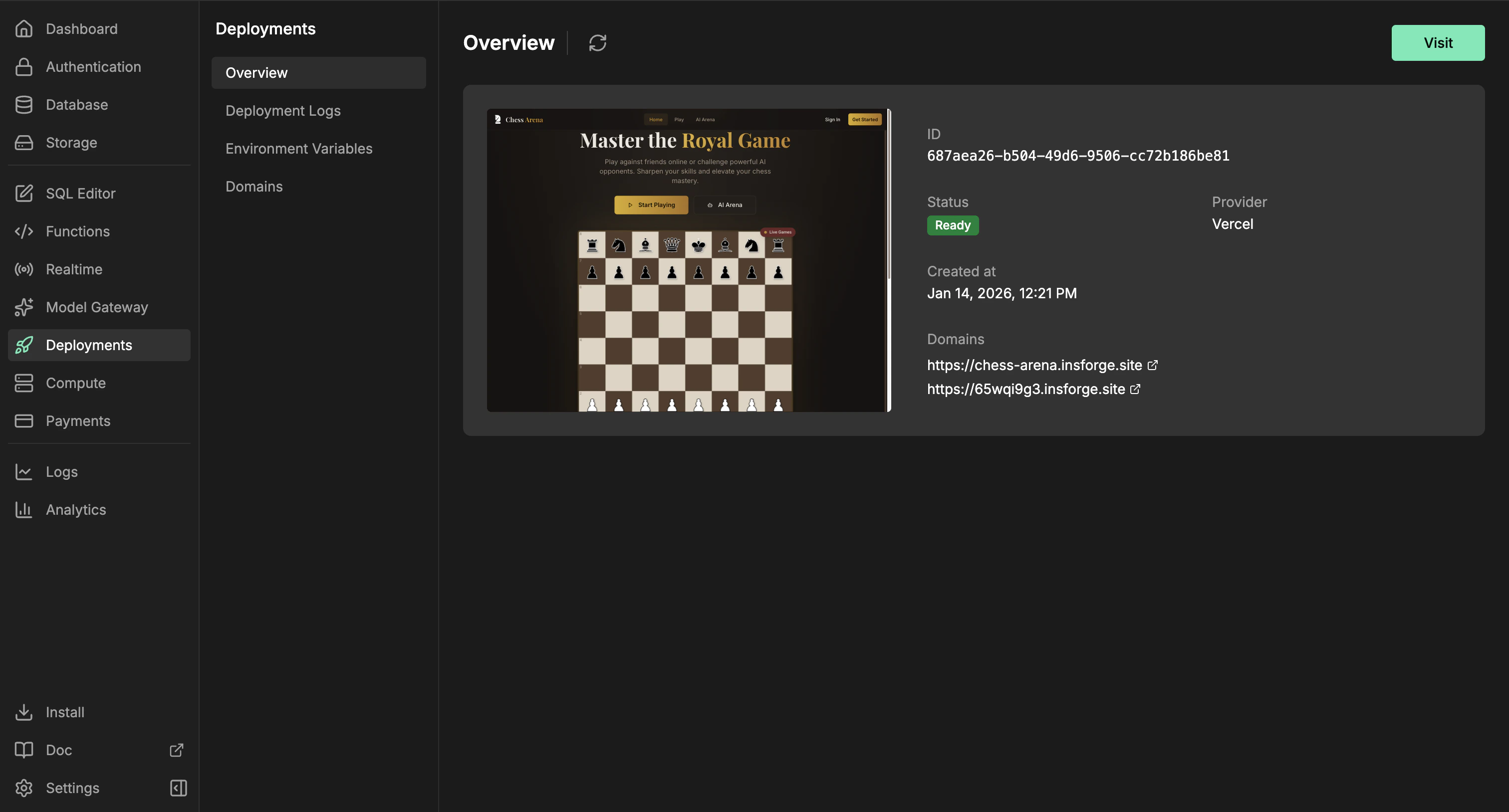
Use InsForge Sites to deploy, publish, ship, or go live with the browser-facing app you built on InsForge. If you are asking "can I deploy my app?" or "how do I take my app live?", Sites is the answer. The InsForge CLI uploads your frontend source through InsForge, which creates a Vercel production deployment. The dashboard tracks the URL, status, deployment history, environment variables, and domains.
 **Need to deploy a container or backend service?** Use [Compute](/core-concepts/compute/overview) for workers, queues, WebSocket servers, and long-running services. Sites are for frontend websites and framework builds that produce a hosted web app.
**Trying to run InsForge itself on your own servers?** That is self-hosting the InsForge platform, not deploying your app. See the self-hosting guides for [AWS EC2](/deployment/deploy-to-aws-ec2), [GCP](/deployment/deploy-to-google-cloud-compute-engine), [Azure](/deployment/deploy-to-azure-virtual-machines), or any [Linux VPS](/deployment/deployment-security-guide). Sites deploys the app you built; self-hosting deploys the InsForge backend that your app runs on.
```mermaid theme={null}
flowchart TB
CLI[InsForge CLI] --> API[InsForge deployment API]
Dashboard[Dashboard] --> API
API --> Source[Frontend source upload]
API --> Config[Environment variables and domains]
Source --> Vercel[Vercel production build]
Config --> Vercel
Vercel --> App[Frontend app]
App --> URL[Public URL]
App --> Status[Status and deployment history]
style CLI fill:#1e293b,stroke:#475569,color:#e2e8f0
style Dashboard fill:#1e293b,stroke:#475569,color:#e2e8f0
style API fill:#166534,stroke:#22c55e,color:#dcfce7
style Source fill:#0e7490,stroke:#06b6d4,color:#cffafe
style Config fill:#4c1d95,stroke:#8b5cf6,color:#ede9fe
style Vercel fill:#c2410c,stroke:#fb923c,color:#fed7aa
style App fill:#166534,stroke:#22c55e,color:#dcfce7
style URL fill:#166534,stroke:#22c55e,color:#dcfce7
style Status fill:#4c1d95,stroke:#8b5cf6,color:#ede9fe
```
## Features
### CLI deploys
Deploy from your app's source directory. The CLI uploads the source tree, skips local-only files such as `node_modules`, `.git`, build output, and `.env` files, then starts the Vercel build through InsForge.
```bash theme={null}
npx @insforge/cli deployments deploy ./frontend
```
### Framework builds
Deploy React, Vue, Svelte, Next.js, static sites, and other frontend projects. InsForge sends the source files to Vercel, where framework detection and project files such as `package.json` and `vercel.json` decide how the app builds.
### Environment variables
Manage provider environment variables from the dashboard. Use public prefixes such as `VITE_` or `NEXT_PUBLIC_` only for values that are safe to expose in browser code.
```bash theme={null}
npx @insforge/cli deployments env list
npx @insforge/cli deployments env set VITE_INSFORGE_URL https://your-project.region.insforge.app
npx @insforge/cli deployments env set VITE_INSFORGE_ANON_KEY ik_xxx
```
### Deployment history
Review previous runs, sync Vercel status, inspect metadata, and cancel in-progress deployments from the Deployment Logs page.
```bash theme={null}
npx @insforge/cli deployments list
npx @insforge/cli deployments status deployment_123 --sync
npx @insforge/cli deployments cancel deployment_123
```
### Domains
Every ready deployment gets a default URL at `https://.insforge.site`. You can also set an InsForge-managed slug at `https://.insforge.site`. For a custom domain, add the domain in the dashboard and configure the DNS record it returns, usually a CNAME for subdomains.
## Deploy with it
Connect your project and run InsForge CLI commands from your app directory.
## Next steps
* Set up the [CLI](/quickstart) and connect your project.
* Add browser-safe environment variables from the dashboard or with `npx @insforge/cli deployments env set`.
* Run `npx @insforge/cli deployments deploy ./frontend`.
**Need to deploy a container or backend service?** Use [Compute](/core-concepts/compute/overview) for workers, queues, WebSocket servers, and long-running services. Sites are for frontend websites and framework builds that produce a hosted web app.
**Trying to run InsForge itself on your own servers?** That is self-hosting the InsForge platform, not deploying your app. See the self-hosting guides for [AWS EC2](/deployment/deploy-to-aws-ec2), [GCP](/deployment/deploy-to-google-cloud-compute-engine), [Azure](/deployment/deploy-to-azure-virtual-machines), or any [Linux VPS](/deployment/deployment-security-guide). Sites deploys the app you built; self-hosting deploys the InsForge backend that your app runs on.
```mermaid theme={null}
flowchart TB
CLI[InsForge CLI] --> API[InsForge deployment API]
Dashboard[Dashboard] --> API
API --> Source[Frontend source upload]
API --> Config[Environment variables and domains]
Source --> Vercel[Vercel production build]
Config --> Vercel
Vercel --> App[Frontend app]
App --> URL[Public URL]
App --> Status[Status and deployment history]
style CLI fill:#1e293b,stroke:#475569,color:#e2e8f0
style Dashboard fill:#1e293b,stroke:#475569,color:#e2e8f0
style API fill:#166534,stroke:#22c55e,color:#dcfce7
style Source fill:#0e7490,stroke:#06b6d4,color:#cffafe
style Config fill:#4c1d95,stroke:#8b5cf6,color:#ede9fe
style Vercel fill:#c2410c,stroke:#fb923c,color:#fed7aa
style App fill:#166534,stroke:#22c55e,color:#dcfce7
style URL fill:#166534,stroke:#22c55e,color:#dcfce7
style Status fill:#4c1d95,stroke:#8b5cf6,color:#ede9fe
```
## Features
### CLI deploys
Deploy from your app's source directory. The CLI uploads the source tree, skips local-only files such as `node_modules`, `.git`, build output, and `.env` files, then starts the Vercel build through InsForge.
```bash theme={null}
npx @insforge/cli deployments deploy ./frontend
```
### Framework builds
Deploy React, Vue, Svelte, Next.js, static sites, and other frontend projects. InsForge sends the source files to Vercel, where framework detection and project files such as `package.json` and `vercel.json` decide how the app builds.
### Environment variables
Manage provider environment variables from the dashboard. Use public prefixes such as `VITE_` or `NEXT_PUBLIC_` only for values that are safe to expose in browser code.
```bash theme={null}
npx @insforge/cli deployments env list
npx @insforge/cli deployments env set VITE_INSFORGE_URL https://your-project.region.insforge.app
npx @insforge/cli deployments env set VITE_INSFORGE_ANON_KEY ik_xxx
```
### Deployment history
Review previous runs, sync Vercel status, inspect metadata, and cancel in-progress deployments from the Deployment Logs page.
```bash theme={null}
npx @insforge/cli deployments list
npx @insforge/cli deployments status deployment_123 --sync
npx @insforge/cli deployments cancel deployment_123
```
### Domains
Every ready deployment gets a default URL at `https://.insforge.site`. You can also set an InsForge-managed slug at `https://.insforge.site`. For a custom domain, add the domain in the dashboard and configure the DNS record it returns, usually a CNAME for subdomains.
## Deploy with it
Connect your project and run InsForge CLI commands from your app directory.
## Next steps
* Set up the [CLI](/quickstart) and connect your project.
* Add browser-safe environment variables from the dashboard or with `npx @insforge/cli deployments env set`.
* Run `npx @insforge/cli deployments deploy ./frontend`.